 Open
OpenSystem and recovery backups
Video course · OpenNCCM from scratch · in Spanish
Copias y actualizaciones
Lesson 9.2 of 30 · Module 9 · Administration
See the full courseUpdates
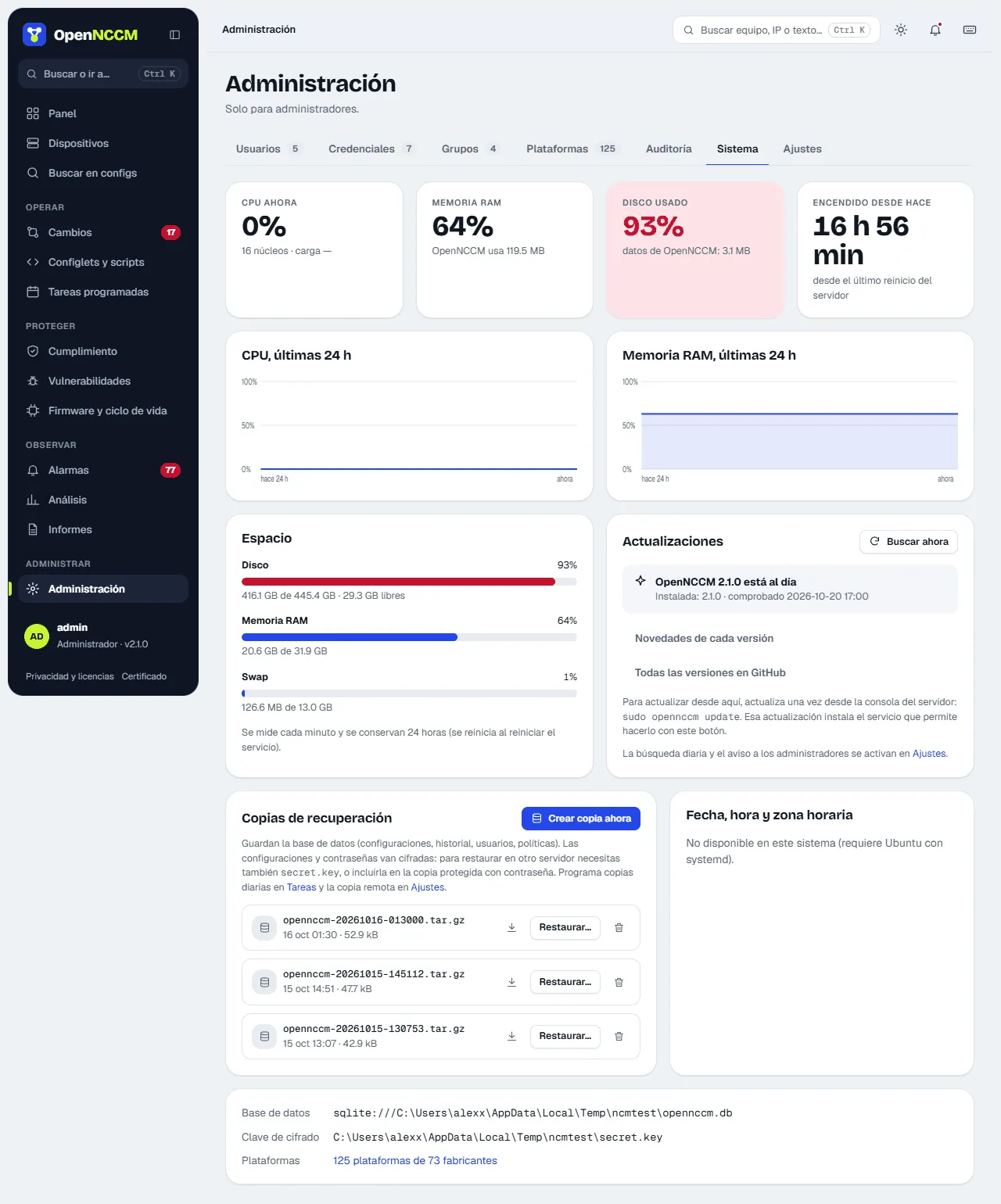
Section titled “Updates”The Updates card shows the installed version and the latest published one. Check now queries GitHub; OpenNCCM also does it once a day (can be turned off in Settings) and, if there is a new version, shows administrators a notice with what is new (See and update or Later, which does not repeat it in that session).
What’s new in each version opens a window with what each version added or fixed (the installed one is marked) and, if there is a new one, what it brings before upgrading. All versions on GitHub opens the project’s releases page.
Update now (asks for confirmation) does the same as sudo opennccm update on the console: a prior backup of the code and database, installation, verification and automatic return to the previous version if the new one does not start. A page shows the progress; OpenNCCM stops for 1-2 minutes. For security the application has no system administrator permissions: it only leaves a request handled by a systemd service (opennccm-webupdate) installed since 1.6.0.
Recovery backups with the key
Section titled “Recovery backups with the key”If you tick “Include the encryption key”, the whole file is encrypted (AES-256-GCM) with a password of at least 12 characters that you choose, and ends in .enc. Without that password it cannot be restored: keep it separately. When restoring with sudo opennccm restore FILE.enc you are asked for it.
The System tab also shows the server’s performance, disk space, the server date and time, the database and key in use, and the recovery backups: Create backup now (with or without the encryption key), download, delete and Restore… (explains the console command that restores it). 4 are shown at a time; the rest with the scroll bar on the edge.
Date, time and time zone
Section titled “Date, time and time zone”- Time zone: choose it from the list (grouped by region) and click Change zone. OpenNCCM restarts for a few seconds so the history and scheduled tasks use the new time.
- Synchronize with NTP: a switch that keeps the time accurate automatically (recommended).
- Set date and time by hand: turning NTP off shows the date and time fields and the Set button.
The service has no administrator privileges: through a polkit rule, the installer grants it permission only for these three actions. Every change is recorded in the Audit log.
Git copy
Section titled “Git copy”With Push each new version to Git, every backup with changes is pushed as a commit to a Git repository (GitHub, GitLab, Gitea…), with a message such as “R1: +3/-1 lines [scheduled]”. Each device is a file <group>/<device>.cfg with its latest configuration. The repository is given over HTTPS with a user and token (stored encrypted and never written in the URL or to disk) or over SSH with the service user’s key. Mask passwords and keys (on by default) replaces the secrets, passwords, SNMP communities and keys it recognizes with <oculto>; even so, use a private repository. Test and push everything now exports every device at once. If the push fails, a “Git copy failed” alarm is recorded and the backup is not affected.
Support OpenNCCM
Section titled “Support OpenNCCM”OpenNCCM is free and open-source software. Administrators see the Support OpenNCCM button in the top bar, and the System and About pages show a card with the ways to donate (GitHub Sponsors and Ko-fi). After upgrading to a new version, the first administrator who signs in sees a notice once with Donate and Not now. The links only open if clicked, in a new tab, and no server data is sent.
The full procedure for backing up, restoring on another server, upgrading and rolling back is in Backups and moving servers and Upgrade and roll back.