Open
OpenFirmware and end of life
Upgrade the devices' operating system remotely, in a controlled and verified way.
Video course · OpenNCCM from scratch · in Spanish
Firmware y ciclo de vida
Lesson 7.2 of 30 · Module 7 · Fleet security
See the full course| Platform | Target | Boot configuration |
|---|---|---|
| Cisco IOS | flash: |
no boot system + boot system flash:IMAGE |
| Cisco IOS-XE (bundle mode) | bootflash: |
boot system bootflash:IMAGE |
| Cisco NX-OS | bootflash: |
boot nxos bootflash:IMAGE |
| Cisco ASA | disk0: |
boot system disk0:/IMAGE |
| Arista EOS | flash: |
boot system flash:IMAGE |
| Juniper Junos | /var/tmp |
request system software add … no-validate |
| MikroTik RouterOS | router root (SFTP, size checked) | Installed on reboot (/system reboot) |
| Ubiquiti airMAX (airOS) and airFiber | /tmp/fwupdate.bin (SCP, size checked) |
fwupdate -m writes it and reboots (Ubiquiti’s method) |
| Ubiquiti EdgeRouter | /tmp (SCP) |
add system image … and reboot |
On MikroTik, airOS, airFiber and EdgeRouter, OpenNCCM backs up the device first before touching the firmware and does not continue if the backup fails. MikroTik can also be upgraded online, without uploading the package: MikroTik: update from MikroTik chooses the channel (stable or long-term) and the router downloads it from MikroTik (/system package update); if it already has the latest version it does nothing, and without “Install and reboot” it only downloads it for the next reboot. Tested on real RouterOS in CI (7.23.8 → 7.25 with the package, and online). UniFi APs, switches and USGs upgrade their firmware from the UniFi Network controller.
How to use it
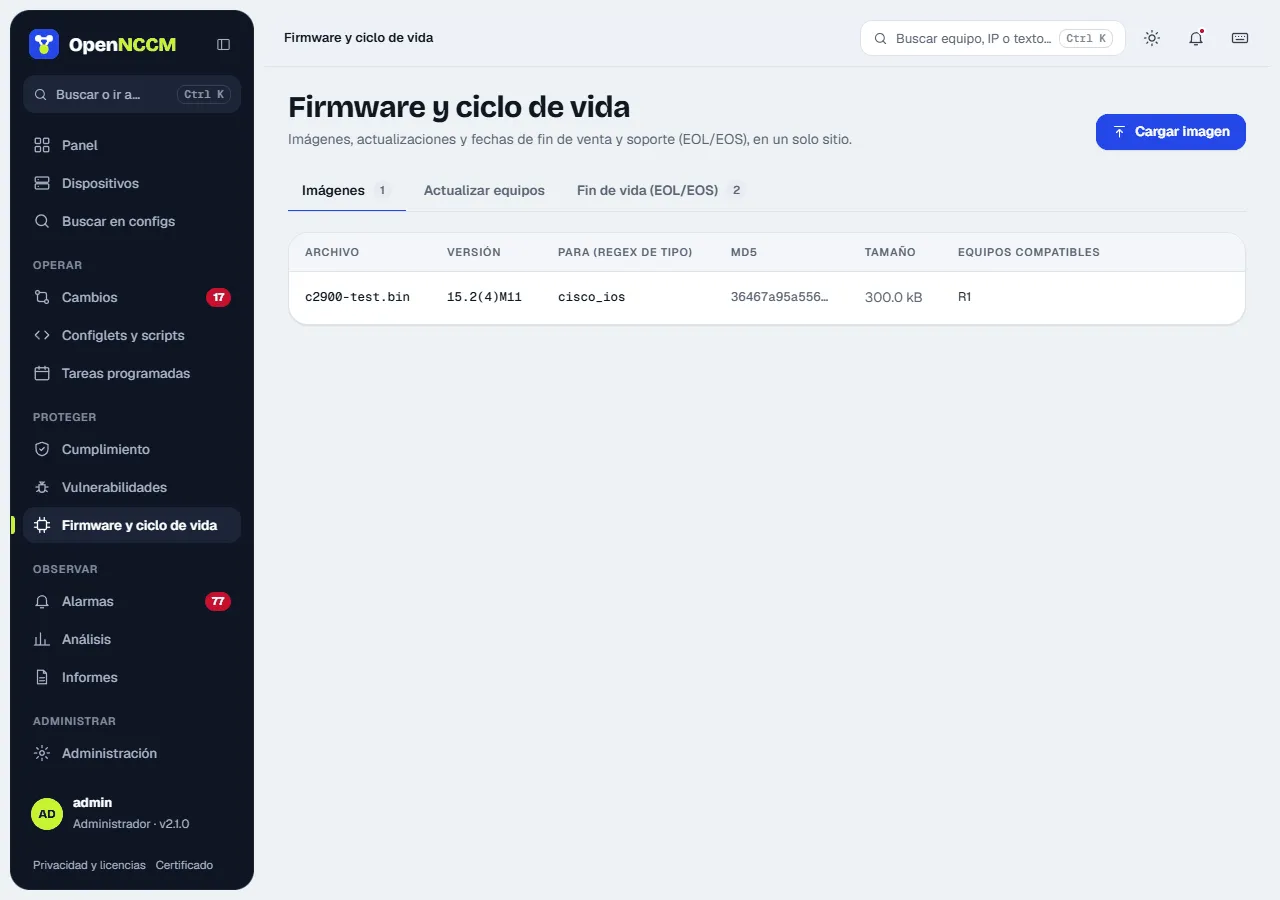
Section titled “How to use it”- (admin) Firmware and lifecycle → Images → Upload image: drag the file, enter the version and which device_type it is for. The table shows the MD5, size and compatible devices.
- Upgrade devices tab (or Use on the image): choose the image; compatible devices with a different version are ticked automatically. If appropriate, tick Reboot each device when done and click Create upgrade request. You can also do it from each device’s page.
- An administrator reviews the planned steps and approves. The result shows whether the file already existed, whether it was transferred and whether the MD5 matched.
- After the reboot, OpenNCCM backs up the device again 15 minutes later to update the version in the inventory.
Available updates
Section titled “Available updates”Once a day OpenNCCM checks whether there is a newer firmware version for each device, and what it improves. The Available updates tab in Firmware and lifecycle lists all devices (those with a new version first); each device shows the tag Firmware X available and, in its Firmware tab, the Firmware updates section. When a new version appears a notice is recorded in Alarms, once per version.
| Devices | Where the version comes from | Download |
|---|---|---|
| MikroTik RouterOS | MikroTik’s official site (stable and long-term), with its release notes | Yes, the file for the device’s architecture |
| Ubiquiti EdgeSwitch, EdgeRouter, UniFi Switch | Ubiquiti’s official catalog, per model | Yes |
| Ubuntu Server and Debian | Official release table (distro-info-data): the newest LTS or stable release and the end-of-support date of the installed one | No: upgrade on the server itself (do-release-upgrade) |
| Cisco, Fortinet, Juniper, Palo Alto, Arista, WatchGuard and others with CPE | NVD’s (NIST) version dictionary: the newest in its branch and the most recent overall | No: the vendor requires an account |
- What it improves: how many CVEs of the installed version no longer affect the new one (with the critical and high ones), the vendor’s release notes when published and the link to them.
- Download to the library (administrators, MikroTik and Ubiquiti): downloads the file from the official site, checks the SHA-256 sum the vendor publishes and saves it in Images. If the sum does not match, the file is discarded. It is then installed like any image: request, approval and prior backup.
- For vendors that require an account, OpenNCCM tells you about the new version and what it improves; the file is downloaded from the vendor’s portal and uploaded with Upload image.
- Check now (on the device page) and Check all now do it right away, in the background. An administrator can turn off the daily check with Check daily. Only the MikroTik, Ubiquiti and NVD sites are queried, without sending any device data.
The NVD version is the most recent one NVD knows about, not an official announcement: confirm it with the vendor. If NVD knows no version equal to or newer than the installed one, OpenNCCM says it cannot tell whether a newer one exists.
End of life (EOL/EOS)
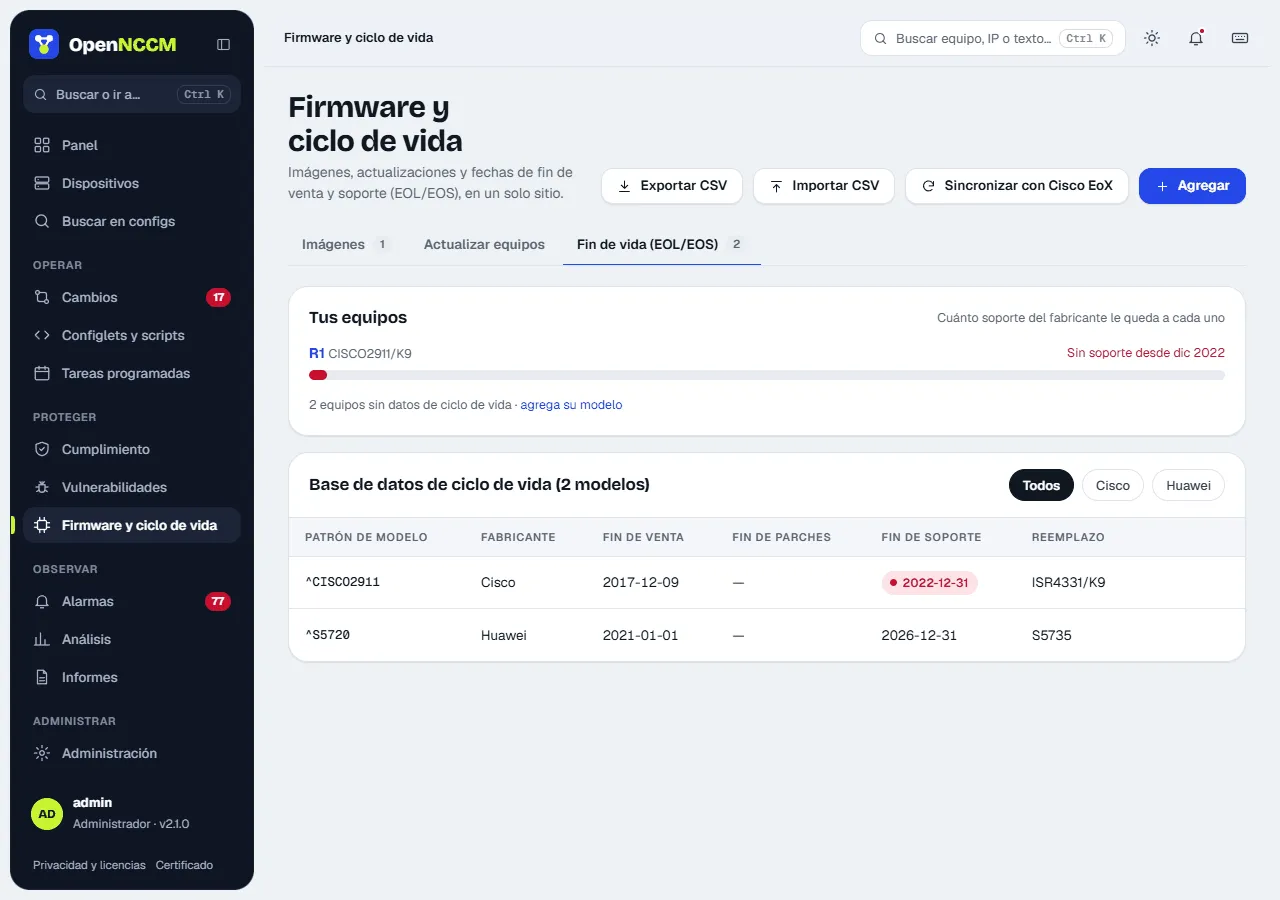
Section titled “End of life (EOL/EOS)”What it is for: know which devices are no longer sold, no longer get patches or are about to lose support, to plan their replacement.
How it works
Section titled “How it works”The lifecycle database associates a model pattern (a regular expression on the inventory model) with its dates. Each device takes the first matching entry and gets a status:
| Status | Condition |
|---|---|
| Unsupported | The end-of-support date has passed. |
| No software patches | The end of software maintenance has passed. |
| End of support < 12 months | Support ends within a year. |
| End of sale | No longer sold, but still supported. |
| Current | None of the above. |
| No data | There is no entry for its model. |
How to load the dates
Section titled “How to load the dates”- By hand: the Add button in the End of life (EOL/EOS) tab; as you type the pattern it shows which devices it matches. Each model in the table can be edited or deleted.
- CSV: the Import CSV button, columns
vendor,model_pattern,end_of_sale,end_of_sw_maintenance,end_of_support,replacement,url. - Cisco EoX API: with apiconsole.cisco.com credentials in Settings, the Sync with Cisco EoX button fills in the dates of every Cisco model in the inventory.