Open
OpenCompliance
Continuously check that configurations meet your security standards and regulations, and fix violations.
Video course · OpenNCCM from scratch · in Spanish
Políticas y reglas
Lesson 6.1 of 30 · Module 6 · Compliance
How it works
Section titled “How it works”- A policy groups rules and applies to devices whose device_type matches its filter (and optionally to a group).
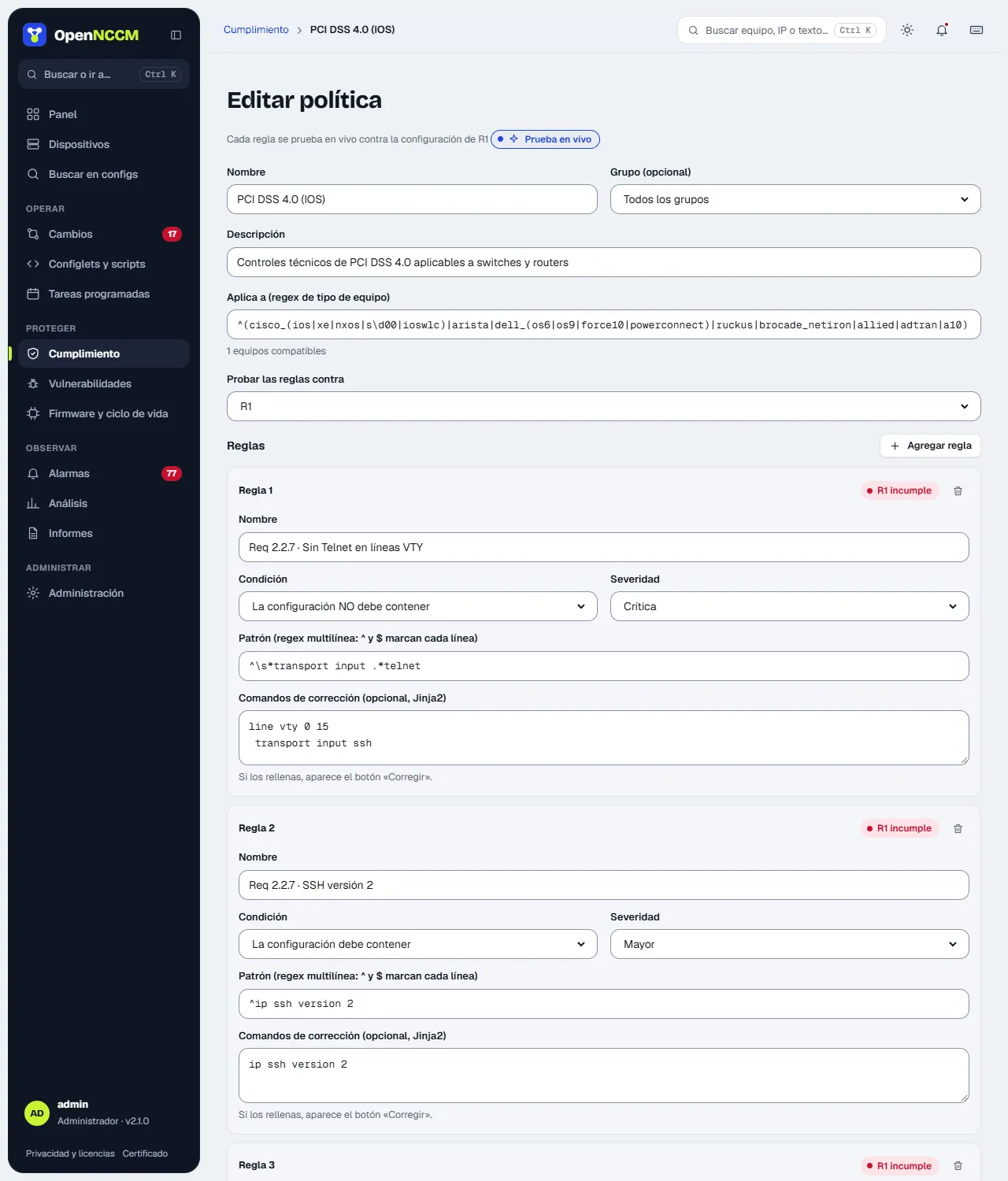
- Each rule is a regular expression that the configuration must contain or must not contain, with a severity (critical, major, minor) and, optionally, fix commands.
- The audit runs by itself after each backup, and also on demand or on a schedule.
Included packs
Section titled “Included packs”| Policy | Rules | Example controls |
|---|---|---|
| PCI DSS 4.0 (IOS) | 15 | No Telnet (Req 2.2.7), no HTTP, no default SNMP communities, passwords ≥ 12, lockout after failed attempts, session ≤ 15 min, AAA, management ACL, syslog, NTP, banner |
| HIPAA §164.312 (IOS) | 9 | Access control, automatic logoff, command auditing, encrypted transmission, SNMPv3 |
| SOX ITGC (IOS) | 8 | Configuration archive, command logging and accounting, centralized authentication |
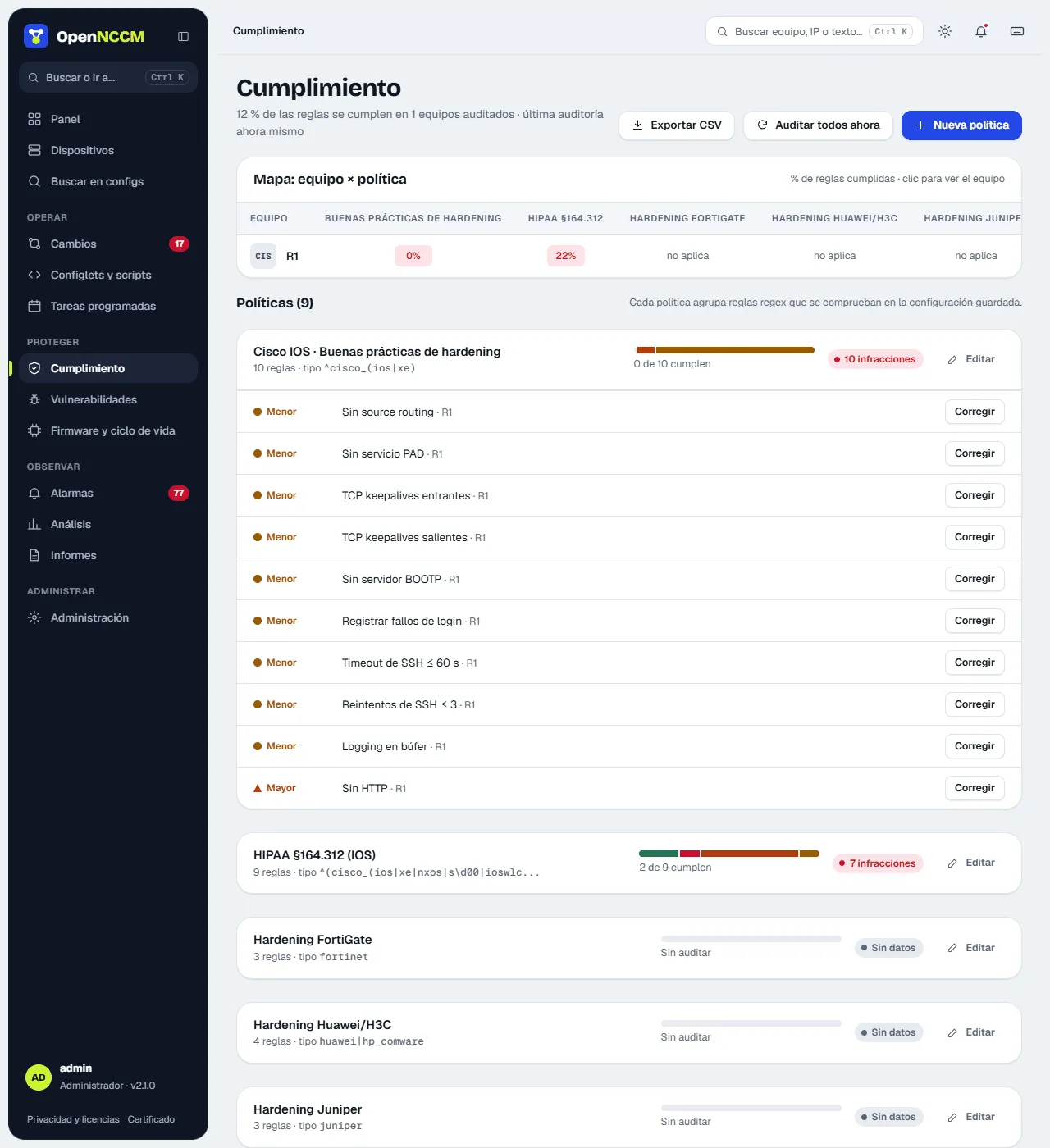
| Cisco IOS · Best practices | 10 | Source routing, PAD, keepalives, BOOTP, SSH timeouts |
| PCI DSS 4.0 (Junos) | 7 | Telnet, HTTP web, root over SSH, retries, idle-timeout, syslog, NTP |
| Extreme VOSS · Basic security | 12 | No Telnet, FTP, TFTP or rlogin; SSH; web over HTTPS only; SNMP without default communities; session timeout ≤ 15 min; RADIUS/TACACS+; syslog; NTP; banner |
| Ubiquiti EdgeSwitch/UniFi · Basic security | 7 | No “ubnt” account; SSH; no Telnet or unencrypted HTTP; SNMP without default communities; syslog; SNTP |
| MikroTik RouterOS · Basic security | 13 | Telnet, FTP, www and API disabled; Winbox and MAC-Telnet restricted; input firewall; SNMP; syslog; NTP |
| Juniper Junos · Basic security | 13 | No Telnet, FTP or J-Web HTTP; root without SSH; lockout after failed attempts; idle session; RADIUS/TACACS+; SNMP; syslog; NTP; banner |
| Ubuntu / Debian · Basic security | 8 | SSH without root password login or empty passwords; only root with UID 0; passwordless sudo only for specific commands; firewall active; automatic security updates; NTP; no Telnet, rsh or TFTP |
| FortiGate · Basic security | 11 | No Telnet or HTTP on interfaces; session ≤ 15 min; trusted hosts; password policy; strong crypto; SNMP; syslog/FortiAnalyzer; NTP |
| Basic hardening (Cisco, Huawei, Juniper, FortiGate) | 3 – 9 | Essential controls per vendor |
The rules are reference technical controls. Full regulatory compliance also requires processes and evidence that do not depend on the device. New packs in each version load by themselves on upgrade; if you delete one, it does not come back. Rules that depend on each network’s addresses (syslog or NTP servers, management networks) have no automatic fix: they say what is missing and the command is written with the real addresses. A change request with example addresses (192.0.2.x, 198.51.100.x, 203.0.113.x) cannot be approved.
How to use it
Section titled “How to use it”- The device × policy map shows the percentage of rules each device passes in each policy (green, amber or red); a click takes you to the device. Below, each policy shows a bar per severity and, when expanded, the failing rules and on which devices. Severity is also shown by shape (diamond critical, triangle major, circle minor). Each rule with a fix shows Fix; if several devices fail it, Fix on N devices… opens the list to tick which ones (one request per device). On the device page, Fix N creates a request with all its fixes together.
- To create or change a policy: New policy or Edit open the editor in a side panel. Each rule has a name, condition (must or must not contain), severity, pattern and optional fix, and is tested live against the chosen device’s configuration as you type (“passes” / “fails”). Save saves the policy and all its rules at once.
- Use Audit all now after changing rules.